|
|||||||||||||||
|
|
|||||||||||||||
 |
|
|
|
|
|
||||||||||


BACKGROUND
This example of assessment targets those individuals with learning difficulties. These difficulties are especially pronounced in communication, number and IT. As a result, any attempt to assess their basic or key skills must acknowledge the need to make both the assessment techniques and methods of presentation appropriate to their specific needs. This focuses upon language and ensuring the assessments allow the individual to build up information and evidence of achievement. The example that follows tries to combine these to produce an effective assessment programme that can be used with trainees and job seekers of all ages.
|
TASK
10 - Produce a simple portfolio of evidence |
Learning Outcomes
At the appropriate Level, the student should be able to:
| Entry Level 1: | Organise work in a simple folder |
| Entry Level 2: | Organise work in a folder with a front sheet of personal details |
| Entry Level 3: | Organise work in a folder with a frontsheet of personal details, dividers for each unit section with appropriate evidence for each unit |
Required Portfolio Evidence
|
Entry
Level 1
|
Entry
Level 2
|
Entry
Level 3
|
| The student follows instructions to organise work in a simple folder … | write own front sheet of personal details and organise dividers for each unit section with work … | and clearly annotated to show where each unit and task belongs |
 |
||
(Each level subsumes the previous level and therefore represents an accumulation of the previous levels.)
Resources:
 Folders,
ring binders, dividers, labels, sticky colour tabs etc
The example that follows is set within a training-learning programme whose focus is 'Handling Information'.
|
The two skill areas covered in this unit are:
Assessment advice: The skill areas "Improving Own Learning" and "Information Technology" are both assessed through the portfolio and the end of unit test. Although much of the assessment may be identified as requiring written responses, it not intended to be a negative experience. It is important therefore that students be allowed to respond in a variety of ways, whether it be orally, by signing, using ICT or where tasks are adapted appropriately Delivery Advice:
Ideas for resources: Create a simple paper database on police, health, school etc. for students to use. Use of a Word-Processing and Database packages. Use of a printer. Knowledge Requirement (The following knowledge will be tested throughout the unit and by the end of unit test) The student will demonstrate knowledge of:
This unit is about the practical activities involved in planning a disco whether for a charity, birthday or special occasion. The two skill areas covered in this unit are:
Assessment advice: The skill areas "Communicating" and "Information Technology" are both assessed through the portfolio and the end of unit test. Although much of the assessment may be identified as requiring written responses, it not intended to be a negative experience. It is important therefore that students be allowed to respond in a variety of ways, whether it be orally, by signing, using ICT or where tasks are adapted appropriately. Delivery Advice:
|
 Much of this unit can be delivered through simulation and
information gathering that is centred based but it is desirable
to include some "real" activities.
|
TASK
1 - Identify an
area of interest to be looked at. |
Learning Outcomes
The student should be able to provide:
| Entry Level 1: | a simple list of ideas of activities that could be organised |
| Entry Level 2: | a list of ideas of activities that could be organised with some explanation |
| Entry Level 3: | a summary of activities that could be organised |
Required Portfolio Evidence
|
Entry
Level 1
|
Entry
Level 2
|
Entry
Level 3
|
| A brainstorm of ideas where an activity will be organised supported with a witness statement. | …and provides a short written explanation of what the student is interested in. | …and provides a summary giving reasoning behind choices of ideas |
| |
||
(Each level subsumes the previous level and therefore represents an accumulation of the previous levels.)
Resources:
| Flip Chart |
OHP |
Ideas for resources:
Recording sheets/action planning sheets, telephone directories, simple database set up by staff with all required information, software packages suitable for Word Processing, Database, Spreadsheet and Desk Top Publishing, CD ROM / Internet.
Knowledge Requirement
(The following knowledge will be tested throughout the unit and by the end of unit test)
The student will demonstrate knowledge of:
Sources of activity information - newspapers, telephone directories,
newsagents, Internet
Activity costs - hire of hall, hire of disco, buying of food /
drinks, insurance, printing of tickets
Activity procedures - booking, deposit, activity insurance, start
& finish times, final payment, security
Use of Information Technology to keep records, write letters and
produce posters for the activity
SKILLS AWARD
Answer all questions below.
1. Get the information! Where would you be mostly to find the following information:
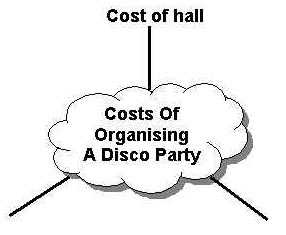
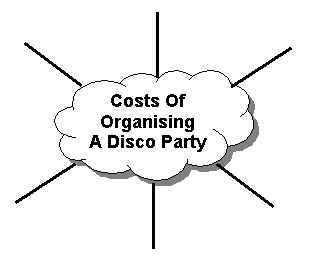
2. Write down 3 different costs involved when running a disco party event. One has been already done for you:
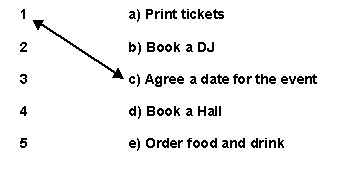
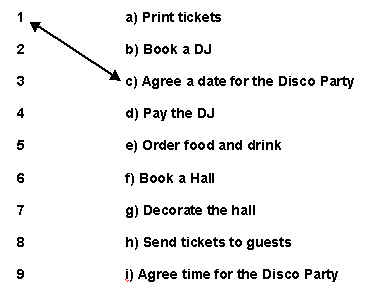
3. Sort the jobs for the disco party into the right order. Match the number with the task:
4. As organiser of the disco event you need to keep a simple database of the tickets sold. Write in the boxes the FIELD HEADINGS you would use for the following information.
5. Write down two important things a person should do when organising any activity:
a)
………………………………………………………………… b) …………………………………………………………………
Answer all questions below.
1. 1. Get the information! What type of information could you get from the following to help you organise an activity. The first one is done for you.
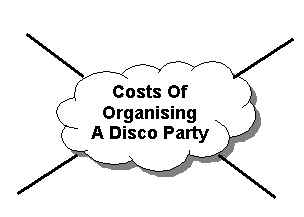
2. Write down 4 different costs involved when running a disco party event:
3. Sort the jobs for the disco party into the right order. Match the number with the task:
4. As organiser of the disco event you need to keep a simple database of the tickets sold. Write in the boxes the FIELD HEADINGS you would use for the following information.
5. Write down two important things a person should do when organising any activity:
a)
………………………………………………………………… b) …………………………………………………………………
Answer all questions below.
1. Get the information! Look at these pictures and list 8 types of information you get from any of these sources to help you organise an activity.
2. Write down 6 different costs involved when running a disco party event:
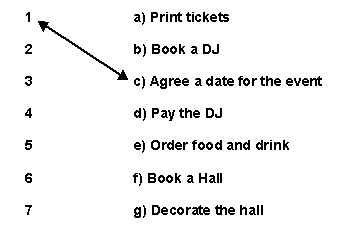
3. Sort the jobs for the disco party into the right order. Match the number with the task:
4. As organiser of the disco event you need to keep a simple database of the tickets sold. Write in the boxes the FIELD HEADINGS you would use for the following information.
5. Write down two important things a person should do when organising any activity:
a)
………………………………………………………………… b)
………………………………………………………………… c) …………………………………………………………………
|
||||||||||||||||||||||||||||||||||||||||||||||||||||||||||||||||||||||||||||||










WELSH
JOINT EDUCATION COMMITTEE: Skills Award
CYD-BWYLLGOR
ADDYSG CYMRU
Mark Scheme: Handling Information
| Question | Option A | Total | Option B | Total | Option C | Total |
| 1. | Name
the type of information Website Advert Yellow Pages Friendly Advice Name & Address |
|||||
| 2. | Costs for a disco party x4 | |||||
| 3. |
Sort
the order of jobs |
|||||
| 4. | 3
Field Headings, e.g. Name Address Number of tickets |
|||||
| 5. | Advice
x 2, e.g Plan Do first jobs first Don't put off jobs |
|||||
| TOTAL |

|
WJEC NREC |
||
| Produced
by: UK: WJEC, NREC Germany: BILSE (Institute for Education and Research), Economic Development Company Greece: PRISMA Sweden: Swedish University Agricultural Department, Hogsby Municipality, Sweden |
||
 |
Project carried out with the support of the European Community within the framework of the Leonardo da Vinci Programme. This document does not necessarily represent the Commission's official position. |
|